Film One Short Video, Live Everywhere the Next Day
Film one short from a printed page and have it live on every platform you use a day later, with one yes from you.
By James Schramko · Updated October 2026
For owners who want a short video out every week without editing, posting or checking it themselves. You need a phone and one helper, a person or an AI.
Posting the video used to be a person's job. That is a small job, and it is one job out of eight. The other seven are where the time goes, and they are the ones that traditionally get done by hand, or skipped.
This is the loop I run now. A piece of paper gets printed with a script outline. A day later the post is live on six platforms and the team has been told once. The numbers come back to pick the next topic. I touch it twice, once with a phone and once with a yes.
The Short Version
- You film from paper: a one-page script outline I call the slip, one take, a phone.
- Your assistant edits from the transcript, never from memory.
- Your assistant writes every platform's words from what was said on camera.
- Your assistant builds one approval message: video, words, where and when. You say yes once.
- Your assistant loads one scheduler, which books every platform a day ahead, weekdays.
- Your assistant files it in one folder and tells the team once.
- Live, then your assistant checks: up, matching, links recorded.
- You watch the comments and let the numbers pick next week's page.
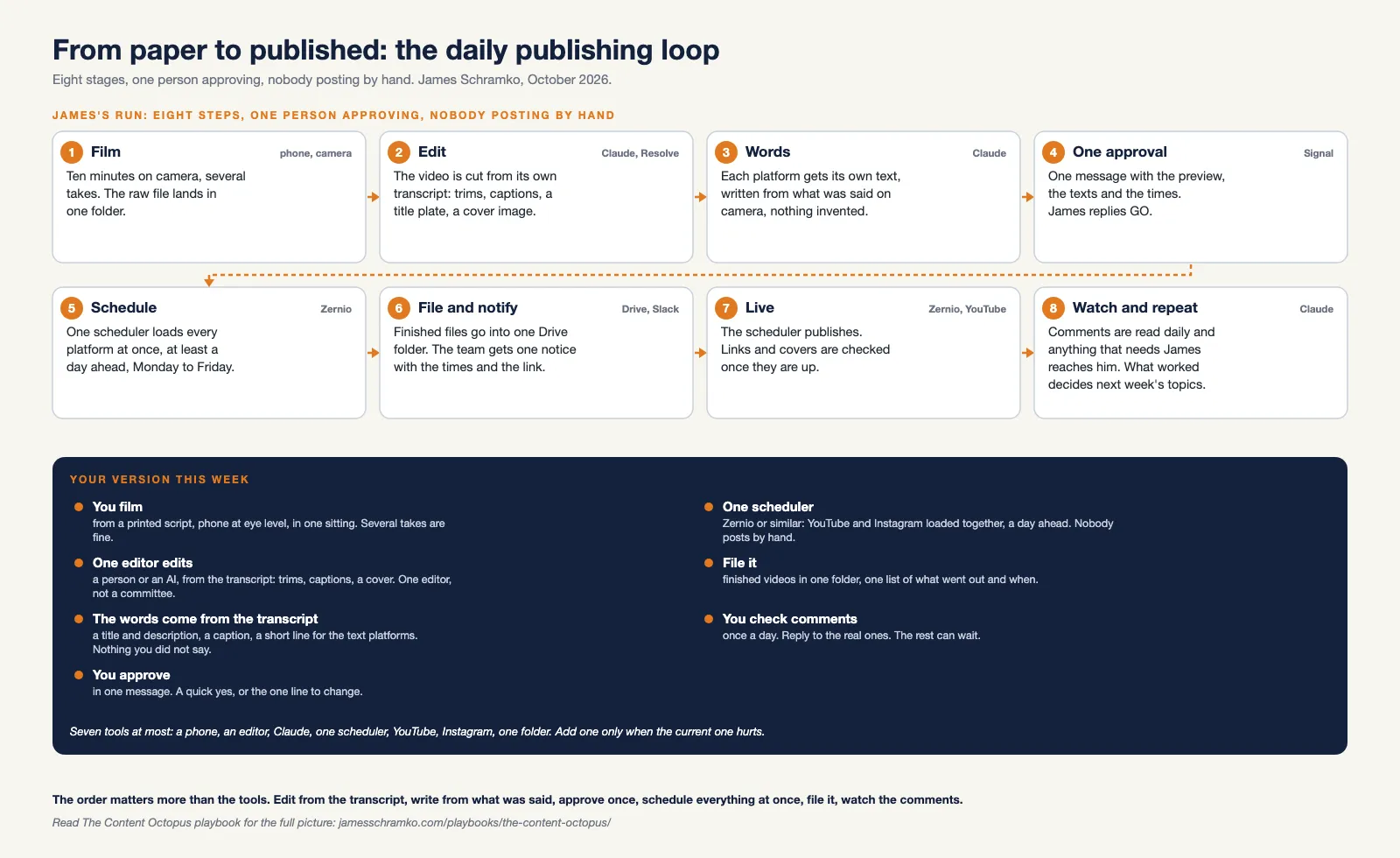
The Loop
Three owners do everything on this page. You. Your assistant, which can be an editor or a VA (virtual assistant). In my setup an AI does that job, and an editor can do the same job. And the scheduler, which is software. Each stage names its owner and what it hands to the next.
One. Film from paper. Owner: you. Your assistant writes the slip, the one-page script outline, the night before and prints it. A topic at the top, the first line to say, one example, three points, and a time: about 35 seconds, one take. Under that, two ways to shoot it. Each has a line for the screen, a line for the cover, three opening lines to pick from and a shot list. You pick up the page, pick up the phone, and film one take. Usually. What passes to your assistant is one video file and the slip number.
Two. Edit from the transcript. Owner: your assistant. Your assistant transcribes the take, then cuts from the words, against the slip. Keep the lines that make the slip's points. Drop the stumbles and the repeats. The sip of coffee stays, the "uh" goes. Captions come from the transcript, never typed from memory. Your assistant makes the cover image. An editor with any editing software can do the same job. What passes is a finished short of 40 to 50 seconds, a cover image and the transcript.
Three. Write every platform's words from what was said. Owner: your assistant. One text for Instagram, Facebook and YouTube. A shorter one for X and Threads. One for LinkedIn that opens differently and ends on a question. A title and tags for YouTube. Every sentence comes from the transcript. If you did not say it on camera, it does not go in the caption. Any line that was not said on camera is listed in the approval message for you to approve or strike. What passes is a small set of text files and the video.
Four. One approval message. Owner: your assistant builds it, you answer it. Everything lands in one message: the video, the cover, the title, each platform's text, where it goes, when, and the reply asked for. You read it once and say yes, or name the fix. A fix means a new message. One yes signs the lot. The real one from 14 October is below.
Five. One scheduler loads every platform. Owner: your assistant loads it, the scheduler posts. Something like Zernio takes the video and each platform's words and books the posts. Go-live is at least a day out, weekdays only. Two pieces approved in one sitting go live a day apart. Nobody opens an app to post.
Six. File it and tell the team once. Owner: your assistant. The finished package goes into a dated folder on Google Drive. One message goes to the team channel on Slack: the piece, the platforms, the go-live times and a link to the folder. The team checks each post before it goes live and after, and puts any edit request in a second channel. Your assistant makes the edit. If the edit changes the words, the platforms or the time, it goes back through stage four for a new yes.
Seven. Live and checked. Owner: the scheduler publishes, your assistant checks. At go-live the posts publish. After that, your assistant opens each post and confirms it is up and the words match what you approved. Your assistant then writes the live links into the piece's folder. You hear about it only if something is wrong.
Eight. Watch the comments and let the numbers pick next week. Owner: your assistant collects, you decide. You answer the comments, or your assistant does and brings you the ones that need you. Every few days your assistant brings in the numbers: views, reach, likes and comments, per post. A post that does ten times the usual tells you what to say more about. Next week's page comes from that, and from what the people you work with asked about this fortnight. You pick the topic. Your assistant writes the slip, and the loop starts again.
One Real Run
The slip came out of the printer at 7:30 on the morning of 14 October. Nobody Paid $799. Topic: pricing. The week before, five people in my group had a price decision on the table. One had held price against a big customer for the third week. One was charging less than a rival. One had been asked for a discount.
I filmed one take on the phone, 144 seconds, phone mic, well over the 35 seconds on the page. I did not say it the way the slip said it. That is fine. The slip gets me talking. The transcript is what gets edited.
The edit came out at 46 seconds. It opens on a sip of coffee. The price going up is held back as the reveal, and the Mercedes-Benz line follows it. On screen: NOBODY BOUGHT IT AT $799. Cover: NOBODY PAID $799. Title: Nobody Paid $799, So I Did This...
Platform words. Instagram, Facebook and YouTube got the same text. It had the domain that sat at $799, the day it sold at $1,199, and the Mercedes-Benz rule on discounts. The close was the line "Same domain, $400 more, same week, different buyer." LinkedIn opened with the Mercedes-Benz line instead. It ended by asking what the reader is about to discount. X and Threads got the story and two lines, 275 characters.
One approval message that evening. One yes. Zernio booked it. Live on 15 October at 6:40 pm Brisbane on Instagram, Facebook and YouTube, 6:54 on X and Threads, 7:08 on LinkedIn. One Slack message to the team with the folder link. One of the team asked in the thread whether the captions looked small. It was only a question, so it got answered in the thread and the piece posted as is.
Pulled on the morning of 16 October 2026: the Instagram reel had 2,796 views and reached 2,393 accounts. That came with 13 likes and 3 comments. One page and one take.
The Approval Message
This is the message I answered on the evening of 14 October. The lines about files, folders and internal checks are taken out. The public words are as they were sent.
Nobody Paid $799
Video: the 46-second short. Cover: the still that reads NOBODY PAID $799.
Where and when, Brisbane time:
- Instagram, Facebook and YouTube: Thursday 15 October 18:40
- X and Threads: Thursday 15 October 18:54
- LinkedIn: Thursday 15 October 19:08
Instagram and Facebook caption:
I had a domain for sale for $799 and nobody bought it. So I changed the price, and within a day it sold. The interesting thing is I actually put the price up to $1,199.
When I was working with Mercedes-Benz, it was practically forbidden to give a big discount. They knew that protected the brand, and they worked harder on their marketing.
Discount buyers aren't the best buyers. Premium buyers who value what you do will pay more. If you don't sell what you have straight away, take your time to try different angles before you drop the price.
Same domain, $400 more, same week, different buyer.
YouTube: the same words as the caption, with this title and these tags.
Title: Nobody Paid $799, So I Did This...
Tags: pricing, discounting, premium pricing, raise your prices, pricing strategy, small business, business coaching, James Schramko
X and Threads:
I had a domain for sale for $799 and nobody bought it. So I changed the price, and within a day it sold. The interesting thing is I actually put the price up to $1,199.
Premium buyers who value what you do will pay more.
Same domain, $400 more, same week, different buyer.
LinkedIn:
When I was working with Mercedes-Benz, it was practically forbidden to give a big discount. They knew that protected the brand, and they worked harder on their marketing.
I had a domain for sale for $799 and nobody bought it. So I changed the price, and within a day it sold. The interesting thing is I actually put the price up to $1,199.
Discount buyers aren't the best buyers. Premium buyers who value what you do will pay more. If you don't sell what you have straight away, take your time and try different angles before you drop the price.
Same domain, $400 more, same week, different buyer.
What have you got on the market right now that you are about to discount?
Not said on camera, approve or strike: the LinkedIn question, and the YouTube title.
Reply yes, or name the fix.
One yes, and the rest of the loop ran without me.
Your Version This Week
The tools matter less than the order. The smallest version is you and one assistant: one platform, one scheduler, one approval, one check. You need an assistant who can cut a video, and a scheduler account connected to one platform. That is the whole setup.
- You. Tonight, open your notes from your last client call. Pick one question your client asked. Write tomorrow's short about it on one page: a question, the first line, one example, three points. Done when the page is printed or handwritten and on the desk.
Where the topic comes from. Your last client call is the easiest start. After a few weeks, draw from four places:
- Your client calls. What people asked you this week.
- Your past posts. The ones that did far better than usual. Say more about those.
- What you see online. Topics people are starting to talk about. Note them down when you see them.
- What you care about and know better than most.
- You. One take on the phone. Stop at 60 seconds. Done when the video and the page are with your assistant.
- Your assistant. Transcribe the take. Cut from the transcript, against the page. Captions from the transcript. Resolve, CapCut, or whatever they have. Done when there is a finished short and a transcript.
- Your assistant. Write the post text from the transcript, a title and a cover image, for the one platform you picked. Done when it is all in one message to you: video, cover, title, text, where, when, and the line "Reply yes or name the fix."
- You. Read the message once. Say yes, or name the fix. A fix comes back as a new message. Done when you have said yes to one message.
- Your assistant. Load the approved package into the scheduler, Zernio or any tool that posts from one place. Book it a day ahead, on a weekday. Done when the scheduler shows the post booked for that time.
- Your assistant. After the scheduled time, open the post. Is it up, are the words the ones you approved, has anyone commented. Done when the live link and any comments are back with you.
- You. Before you write the next page, read the comments and look at one number. Done when tomorrow's page names its topic.
Leave out: a team, a folder structure, a team channel, a numbers report. Those arrive when you have ten pieces live and something to report.
What Not to Do
Post by hand. Every app you open is a chance to rewrite the caption, change your mind and post an hour late.
Write captions from memory. You will write what you meant to say. The viewer heard something else.
Approve five times. One approval, in one message, covers the whole piece. If you approve the video, then the caption, then the time, then the thumbnail, the loop has five places to stall.
Add a platform before the first one works. Get one platform running on schedule for a month. Then add the next. Adding a platform in the scheduler takes a minute. The checking is what costs you, and every extra platform adds to it.
Build a system before the first ten pieces. The slip, the folder, the team message, the check: each one was added after something went wrong on a real piece. Ten pieces through the small loop above will show you which parts you need.
Where This Page Sits
What one recording turns into is The Content Octopus. Why the posts send people to a free library is Give It Away and Let It Pay. Why the base is my own site and the platforms are rented is Own the Racecourse. Those pages cover the reasons behind it, and this one covers the loop.
The loop is the same for a one-person business and for mine. What goes on the page, and what the numbers mean when they come back, is the judgment part. That is the work I do with owners inside Mentor.